Enable Boosting
Entry Boosting with USDC
Allow users to purchase extra raffle entries using USDC. Creators can monetize raffles while users increase their chances of winning.
Boosting allows users to purchase more entries into a raffle or raid using USDC.
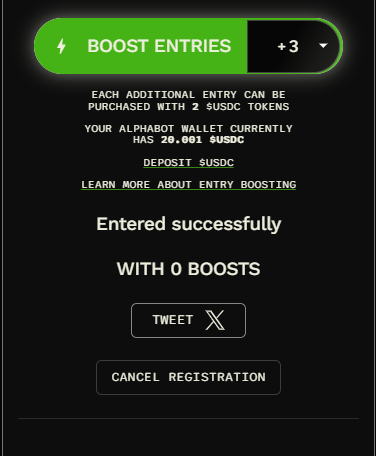
Users see the Boost option after joining the raffle and completing its other requirements. Extra entries increase their chance of winning, but do not guarantee a win.
For Teams (Creators)
Section titled “For Teams (Creators)”Step-by-Step: Setting Up Boosting on a Raffle
Section titled “Step-by-Step: Setting Up Boosting on a Raffle”-
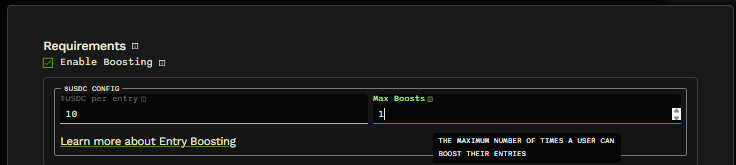
Check “Enable Boosting” under tasks/requirements while creating a new raffle. https://www.alphabot.app/new
-
Set “$USDC per entry”, the price of each extra entry.
-
Set “Max Boosts” to limit the number of times each user can boost. For example, a limit of 5 allows up to 5 boosts. At $2 USDC per entry, 5 extra entries cost $10 USDC.
- Team owners & managers can set the Raffle $USDC Receiver on the Team Management page, or leave it as the default (the raffle creator).

Your team can now monetize raffles and earn USDC with the collabs you already run every day.
Revenue split
Section titled “Revenue split”- Proceeds from entry boosting are held in escrow until the raffle ends to prevent abuse.
- Revenue split:
- 50% of USDC spent goes to your Alphabot Wallet. (raffle creator)
- 50% goes to Alphabot (for gas, rewards, ecosystem costs).
Boosting Details
Section titled “Boosting Details”- Raffle Boosting is an on-chain microtransaction utility.
- Users purchase more entries into raffles or raids with USDC.
- Once enabled, boosting is available only after users have entered normally.
- All raids have boosting enabled by default, and each Boost increases the raid’s rewards pool.
Special Rules for Raids
Section titled “Special Rules for Raids”-
Boosting is always enabled on raids.
-
Revenue split for raids:
- 25% goes to the raid creator.
- 25% goes into the raid’s boost reward pool.
- 50% goes to Alphabot.
For users:
Section titled “For users:”- Enter the raffle and complete all required tasks first.
- Once entered, use USDC from your Alphabot Wallet to buy extra entries.
- The raffle creator sets the USDC cost per boosted entry.
- A Max Boost limit may be set (or left unlimited).
- All raids will always have boosting enabled.