Exporting Winners Data
Once a raffle is completed, the team member who created it or another member of the same team can export the winners’ data.
Open the entries page
Section titled “Open the entries page”- Open the completed raffle.
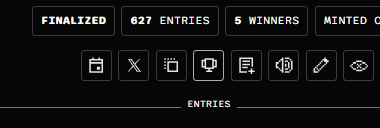
- Click the Entries icon shown below to open its entries page.
- In the winners section, click the download arrow on the right to open the export menu.
Choose an export option
Section titled “Choose an export option”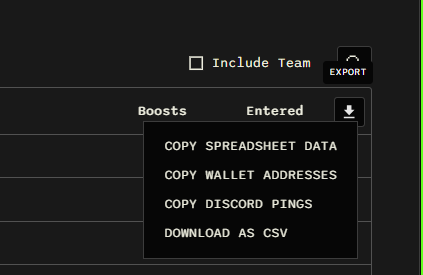
| Option | What it does |
|---|---|
| Copy Spreadsheet Data | Copies the data so you can paste it into a spreadsheet. |
| Copy Wallet Addresses | Copies the wallet addresses for the selected group of entrants. |
| Copy Discord Pings | Copies Discord mentions so you can paste them into a Discord message to tag the entrants. |
| Download as CSV | Downloads the data as a CSV file that you can open in a spreadsheet app. |
Export other entrants
Section titled “Export other entrants”Other entrants appear below the winners on the same entries page. The team can also copy or download their data using the export options for that section.
For wallet collections
Section titled “For wallet collections”Entries with duplicate social accounts (e.g. Discord or Twitter) are automatically removed in regular raffles when winners are picked, but in the case of a wallet collection, make sure to click on Re-validate entries on the Entries page before exporting the winners data to remove duplicates, if any.